7 Mailchimp Alternatives for Small Businesses and Online Stores (2026)
Mailchimp alternatives compared on monthly price at 1,000, 5,000 and 10,000 contacts, free plan limits, and who each one fits, with prices checked November 5, 2026.
Disclosure: We may earn a commission if you buy through links on this page, at no extra cost to you. It never affects our ratings. How we make money.
On this page
- Monthly price at the same list size
- Free plans compared
- 1. Omnisend: best fit for an online store
- 2. GetResponse: email plus landing pages and webinars
- 3. Kit: a large free plan for creators
- 4. EmailOctopus: low price and a big free plan
- 5. Moosend: low price with store tracking
- 6. Benchmark Email: every feature on every plan
- 7. Klaviyo: strong for stores, priced on profiles
- How to choose
- Key takeaways
- Frequently asked questions
People leave Mailchimp for two main reasons: the bill climbs as the list grows, and the free plan is small. If either sounds familiar, the tools below are worth comparing. We priced each one at the same list sizes so you can see the gap for yourself. For the full Mailchimp breakdown, see our Mailchimp pricing guide.
All prices are in USD, monthly billing, regular list price, and were read from each vendor’s pricing page on November 5, 2026. Mailchimp’s tier prices come from our check on October 29, 2026. Vendors change prices often, so confirm on their sites before you buy. Comparing Mailchimp with Constant Contact specifically? See Mailchimp vs Constant Contact. Everything here comes from public pricing and help pages, not from our own use of these tools.
Monthly price at the same list size
| Tool and plan | 1,000 contacts | 5,000 contacts | 10,000 contacts |
|---|---|---|---|
| Mailchimp Essentials (baseline) | $26.50 | $75 | $110 |
| Mailchimp Standard (baseline) | $45 | $100 | $135 |
| EmailOctopus Pro | $13.50 | $31.50 | $44.50 |
| Moosend Pro | $16 | $48 | $88 |
| GetResponse Starter | $19 | $54 | $79 |
| Benchmark Email Pro | $19 | $49 | $89 |
| Omnisend Standard | $20 | $81 | $132 |
| Kit Creator | $39 | $89 | $139 |
| GetResponse Marketer | $59 | $95 | $114 |
Swipe to see the full table →
A few notes on reading this table:
- Mailchimp bills by contact band, so the 1,000 column is the 501–1,500 band, the 5,000 column is 2,501–5,000, and the 10,000 column is 5,001–10,000. Its Free plan has a 250-contact limit, and Mailchimp showed 15% off the first year on 5,000+ contacts, which we left out.
- Kit’s Creator figures are monthly-billing prices derived from its yearly price (yearly price plus the “save” amount, divided by 12), because the page shows the yearly rate. Kit’s yearly rates are $33, $75 and $116 per month at these sizes.
- Omnisend’s page quotes three months at a time, so we divided by three.
- Plans are not identical. Prices are shown for the entry paid plan with automations unless noted, and GetResponse Marketer is listed separately because abandoned cart recovery starts there.
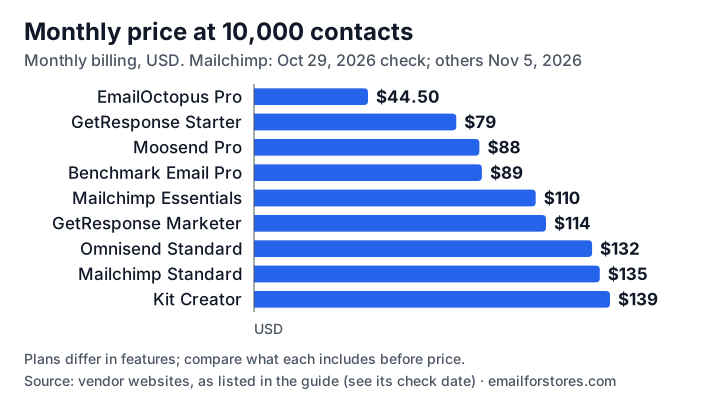
The gap widens as your list grows, which is why the cost question gets sharper at 5,000 contacts and above.
Free plans compared
| Tool | Free plan limits | Worth knowing |
|---|---|---|
| Mailchimp | 250 contacts, 500 sends a month (250 a day) | Sending pauses if you exceed limits |
| Omnisend | 250 contacts, 500 emails a month | E-commerce workflows and 24/7 support included |
| Benchmark Email | 500 contacts, 1,000 sends a month | Benchmark branding shows on emails and forms |
| EmailOctopus | 2,500 subscribers, 10,000 emails a month | EmailOctopus branding on emails; 1 landing page and 1 form |
| Kit | Up to 10,000 subscribers | No visual automation builder or sequences on Free |
| GetResponse | 14-day free trial, no permanent free plan | Premium features end after day 14 |
| Moosend | 30-day free trial, no credit card | See pricing page for plan limits after the trial |
Swipe to see the full table →
1. Omnisend: best fit for an online store
Omnisend is built around store data. Welcome series, abandoned cart and order and shipping confirmations are available as workflows, and its page lists 24/7 live chat and email support on every plan, including free.
Better than Mailchimp: e-commerce automations are part of the product rather than something you piece together, and the free plan includes web push notifications alongside email. Worse: at 10,000 contacts its Standard plan lists at $132 versus Mailchimp Essentials at $110, and SMS sits on a higher plan. Best for: Shopify and WooCommerce stores that rely on automated flows. See Omnisend vs Mailchimp for the full comparison.
Omnisend
Best for storesBest for: Online stores that want abandoned cart and welcome flows without extra setup
- E-commerce workflows listed on every plan
- 24/7 chat and email support, even on free
- Free plan includes web push
- Higher than Mailchimp Essentials at 10,000 contacts
- SMS is on a higher plan
2. GetResponse: email plus landing pages and webinars
GetResponse Starter lists at $19/month for 1,000 contacts and $79 at 10,000, with unlimited monthly sends and one custom automation workflow. Abandoned cart recovery, sales funnels and recommended products start on Marketer, which lists at $59 at 1,000 contacts and $114 at 10,000.
Better than Mailchimp: no send cap on Starter and a lower price than Mailchimp at 10,000 contacts ($79 versus $110 for Essentials). Worse: it has a 14-day trial rather than a permanent free plan, and the store features cost more on Marketer. Best for: businesses that also run landing pages, funnels or webinars. Details in GetResponse vs Mailchimp.
GetResponse
Email plus webinarsBest for: Small businesses that want landing pages and funnels in one tool
- Unlimited monthly sends on Starter
- Landing page builder included
- Lower than Mailchimp Essentials at 10,000 contacts
- No permanent free plan
- Abandoned cart needs the Marketer plan
3. Kit: a large free plan for creators
Kit’s free plan covers up to 10,000 subscribers with unlimited landing pages, forms and email broadcasts. Its pricing page also says there are no sending limits on any plan. Automations, sequences and branding removal need the paid Creator plan, which lists at $39 a month at 1,000 subscribers on monthly billing.
Better than Mailchimp: a far bigger free audience limit and no send caps. Worse: Creator costs more than Mailchimp Essentials at 1,000 contacts, and automations need a paid plan. Best for: newsletter writers, course sellers and creators. Read our Kit review and the tier-by-tier Kit pricing guide.
Kit
Creators and newslettersBest for: Creators who want to grow a large list before paying
- Free up to 10,000 subscribers
- No sending limits on any plan
- Landing pages and forms included
- No automations on the free plan
- Higher entry price than Mailchimp Essentials
4. EmailOctopus: low price and a big free plan
EmailOctopus Pro lists at $13.50 a month at 1,000 subscribers and $44.50 at 10,000 on monthly billing, and its free plan allows 2,500 subscribers and 10,000 emails a month. It is a straightforward sending tool rather than a full marketing suite.
Better than Mailchimp: price and a generous free plan. Worse: fewer built-in e-commerce features, and free-plan emails carry EmailOctopus branding. Best for: small lists and newsletters where cost matters most.
EmailOctopus
Low listed priceBest for: Small senders who mainly need affordable newsletters
- Lists at $44.50 at 10,000 subscribers
- Free plan with 10,000 emails a month
- Unlimited landing pages and forms on Pro
- Fewer e-commerce features
- Branding on free-plan emails
5. Moosend: low price with store tracking
Moosend Pro lists at $16 a month at 1,000 contacts and $88 at 10,000 on monthly billing, with unlimited email sends. Its page lists product views, carts and purchases tracking and a “when someone views any product” automation trigger,.
Better than Mailchimp: lower at every size in our table and unlimited sends. Worse: a 30-day trial instead of a free plan. Best for: growing stores that want behavior tracking at a lower monthly price.
More detail in our Moosend review.
See Moosend pricing6. Benchmark Email: every feature on every plan
Benchmark says every feature is on every plan, including Free, which covers 500 contacts and 1,000 sends a month. Pro lists at $19 at 1,000 contacts and $89 at 10,000 on monthly billing, with sends capped at 10 times the contact limit and one user included.
Better than Mailchimp: features are not gated by plan, and the free plan has more contacts and sends. Worse: it shows Benchmark branding on free emails and charges $15 a month per extra user on Pro. Best for: small teams that want simple pricing.
See Benchmark pricing7. Klaviyo: strong for stores, priced on profiles
Klaviyo is a store-first platform that bills on active profiles. We did not re-check its prices for this update, so see our Klaviyo pricing guide (with its own check date) and Klaviyo alternatives before comparing it with the table above.
How to choose
- Online store with automated flows: Omnisend, or GetResponse Marketer.
- Newsletter or creator business: Kit or EmailOctopus.
- Landing pages and webinars too: GetResponse.
- Low monthly cost at a given size: compare EmailOctopus, Moosend, GetResponse Starter and Benchmark in the table above.
- Staying put: read how Mailchimp counts unsubscribed contacts in our pricing guide before deciding.
Before you move, export only opted-in contacts, rebuild your highest-earning automations first, and send gradually from the new account.
See Omnisend plansStill weighing Mailchimp itself? Our Mailchimp review covers its limits, contact counting and Shopify App Store rating.
For a head-to-head with Mailchimp itself, see ActiveCampaign vs Mailchimp.
Key takeaways
- At 10,000 contacts, Mailchimp Essentials lists at $110/month and Standard at $135; the paid alternatives here list from $44.50 (EmailOctopus Pro) to $139 (Kit Creator).
- Free plans differ a lot: Mailchimp's covers 250 contacts and 500 sends a month, EmailOctopus's 2,500 subscribers and 10,000 emails, Kit's up to 10,000 subscribers.
- For store automations like abandoned cart, Omnisend and GetResponse Marketer are the closest fits; the others are better for newsletters and simple campaigns.
- Prices below are monthly billing at regular list price on November 5, 2026; Mailchimp's tier prices are from our October 29, 2026 check.
Frequently asked questions
What is the best alternative to Mailchimp?
It depends on what you send. For an online store, Omnisend is the closest fit because e-commerce workflows are built in. For a plain newsletter on a tight budget, EmailOctopus or Kit's free plan are worth a look. For landing pages and webinars as well, GetResponse.
Is there a free alternative to Mailchimp?
Several have free plans. EmailOctopus allows 2,500 subscribers and 10,000 emails a month, Kit allows up to 10,000 subscribers, Benchmark Email allows 500 contacts and 1,000 sends a month, and Omnisend allows 250 contacts and 500 emails a month. Each free plan has limits, so check which features you need.
Which Mailchimp alternative is cheaper at 10,000 contacts?
On November 5, 2026, the paid plans in our table listed at $44.50 (EmailOctopus Pro), $79 (GetResponse Starter), $88 (Moosend Pro), $89 (Benchmark Pro) and $132 (Omnisend Standard) per month, against Mailchimp Essentials at $110 and Standard at $135. Features differ by plan, so compare what you get.
Which Mailchimp alternative is best for a small business?
Match the tool to your main job. Small stores that need abandoned cart and welcome flows should look at Omnisend. Small service businesses and creators that mostly send newsletters can start on Kit's or EmailOctopus's free plan.
Will I lose my list if I switch from Mailchimp?
No, you can export your contacts as a CSV and import them elsewhere. Export only people who opted in, and rebuild your key automations before you cancel Mailchimp.