Brevo vs Mailchimp (2026): Pricing, Free Plans and Which Fits a Store
Brevo and Mailchimp compared for online store owners: how each one bills (emails sent versus contacts stored), a cost table at 500 to 10,000 contacts, free plan limits, automation, and when a store-focused tool fits better.
Disclosure: We may earn a commission if you buy through links on this page, at no extra cost to you. It never affects our ratings. How we make money.
On this page
Short answer: The real difference is how you are billed. Brevo charges by how many emails you send each month; Mailchimp charges by how many contacts you store. A store with a large list that emails a few times a month tends to pay less on Brevo; a list under 250 contacts can start free on Mailchimp. Both are general-purpose tools, so if cart recovery and product-based automation are the point, look at a store-focused tool as well.
We do not earn a commission from Brevo or Mailchimp links on this page. We do have an affiliate relationship with Omnisend, which appears below as an alternative. We have not used either Brevo or Mailchimp ourselves: everything here comes from their published pages, read on the dates shown, and all prices are US dollars on regular month-to-month billing.
How each tool bills you
Brevo sells plans by monthly email volume. Its pricing page, checked November 7, 2026, lists Free at $0, Starter at $9, Standard at $18, Professional at $499 and Enterprise as custom, all per month. Paying yearly takes 10% off (Starter $96.96 a year, Standard $194.04). Starter is listed as “From 5,000 emails per month” and the price goes up as you pick a higher volume. Professional starts from 150,000 emails a month and includes 10 seats. The Free plan gives you a plan to upload contacts, and once Brevo approves your account for sending you can send up to 300 emails per day. Brevo also sells pay-as-you-go credits: one email sent uses one credit, and credits do not expire.
Mailchimp sells plans by contact band. Per its help center (read November 6, 2026), you choose how many contacts to store, and that band sets both your price and your send limit. Essentials allows up to 10 times your contact limit in monthly sends, Standard 12 times and Premium 15 times. If you go over, service is not interrupted but you see an extra charge. Subscribed, unsubscribed and non-subscribed contacts all count; archived, cleaned and deleted contacts do not.
Cost at 500 to 10,000 contacts
To compare a send-billed tool with a contact-billed one, we have to assume how often you email. We assume 4 emails per contact per month (about one campaign a week), so monthly volume is contacts times 4. That is a stated assumption, not a measurement of any store: if you also send automations, the volume rises.
| Contacts | Emails a month (contacts × 4) | Brevo Starter | Mailchimp Essentials | Mailchimp Standard |
|---|---|---|---|---|
| 500 | 2,000 | $9 (5,000-email tier) | $13 | $20 |
| 1,000 | 4,000 | $17 (10,000-email tier) | $26.50 | $45 |
| 2,500 | 10,000 | $25 (15,000-email tier) | $45 | $60 |
| 5,000 | 20,000 | $32 (20,000-email tier) | $75 | $100 |
| 10,000 | 40,000 | $46 (40,000-email tier) | $110 | $135 |
Swipe to see the full table →
How we got the Brevo figures: Brevo’s public pricing API (read November 7, 2026) lists Starter at $9 a month for up to 5,000 emails, plus a stairstep charge for more volume: +$8 to 10,000 emails, +$16 to 15,000, +$23 to 20,000, +$30 to 30,000 and +$37 to 40,000. Each tier also carries a contact limit: 500 contacts at 5,000 emails, 1,500 at 10,000, 2,500 at 15,000 and 500,000 from 20,000 emails up. So you pick the tier that covers both your send volume and your stored contacts. At 1,000 contacts, 4,000 emails would fit the $9 tier, but the 500-contact limit pushes you to the $17 tier; at 10,000 contacts, 40,000 emails sit in the 30,001–40,000 tier at $46.
How we got the Mailchimp figures: monthly prices by contact band from Mailchimp’s pricing page, read in a US browser session on October 23, 2026 and re-confirmed unchanged on November 2. Mailchimp’s bands are 0–500, 501–1,500, 1,501–2,500, 2,501–5,000 and 5,001–10,000, so the 1,000-contact row uses the 501–1,500 band. Prices vary by country. Mailchimp’s 10x and 12x send limits comfortably cover 4 emails per contact. For the full band table see our Mailchimp pricing guide.
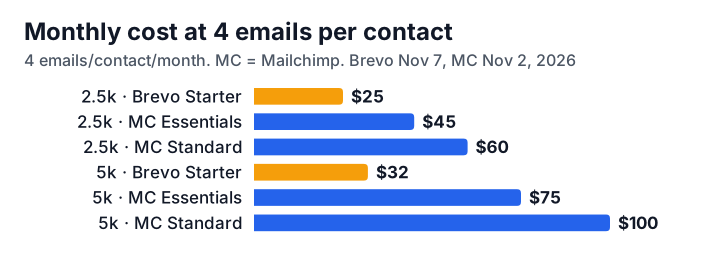
Reading the table: on these assumptions the gap grows with list size, from $4 at 500 contacts to $43 at 5,000 and $64 at 10,000 (Essentials against Starter). Two caveats keep it honest. First, the plans are not identical: Mailchimp Essentials includes A/B testing and flows of up to 4 steps, and Mailchimp Standard goes to 200 flows, while Brevo’s $9 Starter is the entry plan of a tool that bills on volume. Second, the gap shrinks if you email a lot. At 2,500 contacts, 10 emails per contact is 25,000 emails a month (the most Mailchimp Essentials allows at that size, 10x contacts): Brevo Starter’s 20,001–30,000 tier is $39, against $45 on Essentials.
Free plans compared
| Brevo Free | Mailchimp Free | |
|---|---|---|
| Price | $0, no credit card needed | $0 |
| Sending limit | Up to 300 emails per day after account approval | Max 500 sends a month, 250 a day |
| Contact limit | Up to 100,000 contacts (Brevo pricing API) | 250 contacts |
| If you go over | Not confirmed | Live and test sends are put on hold until you upgrade or reduce your list |
Swipe to see the full table →
Brevo’s 300 a day is at most about 9,000 emails over a 30-day month if you sent every day. Brevo’s pricing API lists up to 100,000 stored contacts on Free; we could not confirm a separate monthly cap, so check your account before importing a list. Mailchimp’s free plan is firmly capped, which suits a brand-new list and little more.
Automation, landing pages and SMS
Brevo’s pricing page feature list includes an unlimited number of multi-step automation workflows and A/B testing, without saying on which plan each one starts. Landing pages appear with Standard, which includes 1 page plus click heatmaps and geography and device reports; Starter removes the Brevo logo. SMS credits are sold separately. Brevo says it connects with 150+ tools including Shopify.
Mailchimp limits automation by plan: Essentials has single-email automations and flows up to 4 steps, Standard and Premium up to 200 flows. Standard adds multivariate testing, and its help page says SMS is an add-on in select locations. Mailchimp lists 3 audiences and 3 seats on Essentials, 5 and 5 on Standard, unlimited on Premium.
We have not built a cart-abandonment flow in either tool, so we cannot say which is quicker to set up. Check that the store events you need (carts, orders, product views) are available on the plan you are buying.
How contacts are counted
This is where the billing models bite. On Mailchimp, people who unsubscribed still count, so an old list with many unsubscribes can push you into a higher band; archiving them removes them from your total. On Brevo, price follows emails sent, so people you no longer email do not add send volume. Stored contacts still matter on Brevo, though: each paid volume tier carries a contact limit (500 contacts at 5,000 emails, 1,500 at 10,000, 2,500 at 15,000, 500,000 from 20,000 emails up, per its pricing API on November 7, 2026). A small list that you email rarely can therefore be pushed up a tier by its size, not its sends. Above 2,500 contacts the limit stops binding for most stores.
Which should you choose?
Choose Brevo if:
- your list is large but you email only a few times a month;
- you want to start with a free plan on a list bigger than 250 contacts;
- you want transactional email and marketing in one account (Brevo says all plans include transactional features).
Choose Mailchimp if:
- you have under 250 contacts and want a free start with a familiar tool;
- you plan to send often and prefer a send allowance that scales with your contact count (10x to 15x);
- you value its templates, audiences and seat structure over the lowest price.
Look further if your store’s revenue depends on abandoned cart and post-purchase flows. See Mailchimp alternatives and our best email marketing platforms roundup.
A store-first alternative
Omnisend
Store-firstBest for: Online stores that want cart abandonment workflows from day one
- Free plan with up to 500 emails per month
- Pre-built cart abandonment workflows on all plans
- Pro adds bonus SMS credits equal to your monthly bill
- Smaller free sending allowance than a newsletter tool
- SMS credits are billed separately
Omnisend’s Standard plan listed at $16 for 500 contacts and $44 for 2,500 on our November 2, 2026 reading, with a free plan for 250 contacts and 500 emails a month. For more on Brevo see our Brevo review and Mailchimp review; to follow price changes, use the pricing tracker.
Bottom line
On published prices, Brevo is cheaper for a list that sends about weekly, and the gap widens as the list grows, but its higher-volume prices are older than Mailchimp’s and its price rises if you send more. Mailchimp is simpler for tiny lists and small stores that stay under its free limits, and more expensive as contacts grow. Confirm the price for your own list size and sending rate on each pricing page before you commit.
See Omnisend plansKey takeaways
- The two tools bill differently: Brevo prices by monthly email volume (each volume tier also caps how many contacts you can store), Mailchimp by contacts stored. At about 4 emails per contact a month, Brevo Starter works out at $9 to $46 for 500 to 10,000 contacts, against $13 to $110 for Mailchimp Essentials (Brevo pricing API, November 7, 2026).
- Brevo's Free plan lets you send up to 300 emails a day once your account is approved; Mailchimp's Free plan allows 250 contacts and 500 sends a month (250 a day).
- On Mailchimp, subscribed, unsubscribed and non-subscribed contacts all count toward your bill; archived, cleaned and deleted contacts do not.
- Brevo Starter is $9 for 5,000 emails and up to 500 contacts; storing more contacts forces a higher tier: $17 (10,000 emails, 1,500 contacts), $25 (15,000 emails, 2,500 contacts) and $32 (20,000 emails, up to 500,000 contacts), per Brevo's public pricing API on November 7, 2026.
Frequently asked questions
Is Brevo better than Mailchimp?
Neither is better for everyone, and we have not used either tool, so this is based on their published pages. Brevo suits lists that are large but email occasionally, because it bills by emails sent. Mailchimp suits very small lists that want a free start and one familiar tool, but its price climbs with every contact band. If your main job is store revenue, a store-focused tool such as Omnisend may fit better than both.
Is Brevo cheaper than Mailchimp?
At a send rate of about 4 emails per contact a month, yes on the published figures: Brevo Starter is $9 at 500 contacts and $17 at 1,000 (its tiers cap stored contacts), against $13 and $26.50 for Mailchimp Essentials. The gap widens as lists grow, but it narrows if you email very often, since Brevo's price rises with volume: at 2,500 contacts and 10 emails per contact, Brevo Starter is $39 against $45 for Essentials.
Which has the better free plan, Brevo or Mailchimp?
Brevo's Free plan has a daily cap of 300 emails after approval; Brevo's public pricing API lists up to 100,000 stored contacts on Free (November 7, 2026). Mailchimp's Free plan is capped at 250 contacts and 500 sends a month, and sending is put on hold if you pass 250 contacts. For a list over 250 people, Brevo's free plan is the more usable on the published limits.
Can I move from Mailchimp to Brevo?
Brevo's pricing page has a 'Migrate from Mailchimp' link in its footer, so it offers some migration route. We did not open that page and cannot say what it covers, so check it for what transfers (contacts, templates, automations) before you cancel anything. Mailchimp counts unsubscribed contacts toward your bill, so clean your list before you export it.
Do unsubscribed contacts count toward my bill?
On Mailchimp, yes: subscribed, unsubscribed and non-subscribed contacts all count, while archived, cleaned and deleted contacts do not. Brevo bills by emails sent, so unsubscribed people you no longer email add no send volume. Stored contacts do count toward Brevo's contact limits, which are set by the volume tier you buy (500 contacts on the $9 Starter tier).